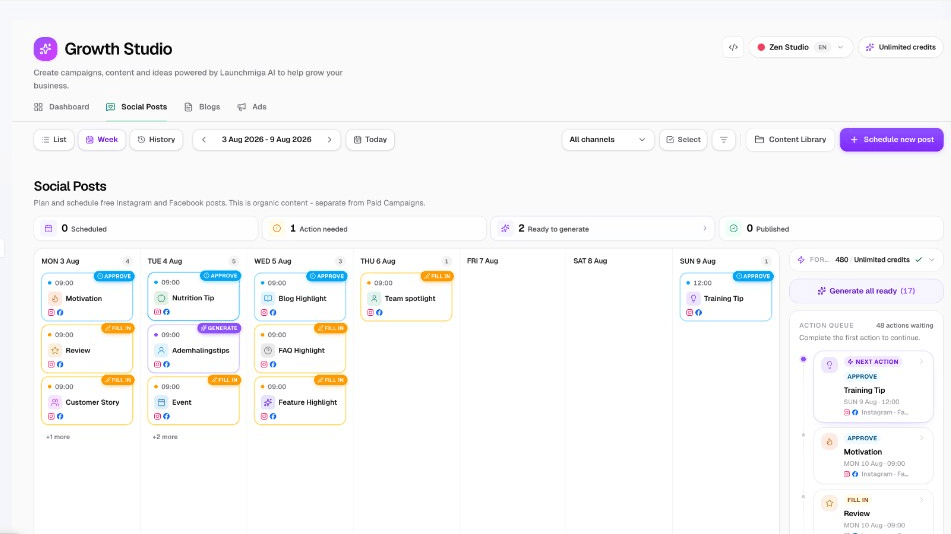
A social media planner is simply a calendar for the posts you want to put out. You see Monday to Sunday, you see which spots are still empty, and you decide what goes in them. In the planner inside Growth Studio you tick a few spots, choose what each one is about, a tip, an offer or a highlight from a blog article, and the posts and reels for Instagram and Facebook are written for you from your own studio profile. You edit the caption, approve it and schedule it. That steady rhythm is what brings people to your page and to your proeflesformulier.
A week calendar where every spot has a subject and a status
Tick several spots and have them written in one go
Nothing is scheduled before you have read and approved it
Instagram and FacebookFeed posts and reelsYou approve every post
Iron District Gym
Social posts - week planner
Scheduled
Planner
Week
List
Feed posts
Reels
Post
Goes out
Tuesday 09:00
Channels
Instagram + Facebook
Approve and schedule
What a week without a plan looks like
You post when you remember, so you post far too little
Nobody plans their feed on purpose. You take a photo after a good class, forget to post it, and three weeks later your page looks abandoned. People who were thinking about a trial class see an old photo and decide to look somewhere else.
Posting from your phone in a free minute
You never know what you already posted last week
Three posts in one day, then nothing for a month
Instagram gets a photo and Facebook gets nothing
Reels stay on the list because editing takes an evening
Your best offer never gets announced twice
Planning the week in the planner
One screen shows the whole week and the empty spots
Each spot has a subject, so you never start from a blank page
A feed post and a reel are prepared for the same subject
You see at a glance what is written, approved or already scheduled
Approved posts go out on the day you picked
Posting when you think of it vs planning the week
Same studio, same photos, but the week is decided before it starts.
Posting from your phone in a free minute
Notes in your phone as a content calendar
Writing every caption in the moment
Copying the same text to both platforms
Hunting for a usable photo every time
Reels skipped because there is no time
No idea what next week looks like
Planning the week in the planner
A week calendar with a spot per post
Captions written from your studio profile
A separate caption per platform when you want
A graphic, a generated photo or your own picture
Feed and reel prepared side by side
Next week is already visible and half filled
Plan next week before Monday arrives
Tick the spots you want to fill, read what comes back and approve. Half an hour buys you a full week.
Trusted by gyms, studios & trainers who want to grow.
From gyms to yoga studios and personal trainers - Launchmiga helps fitness entrepreneurs get more inquiries and members from their website.
1 week
Planned in one sitting
2
Platforms kept active side by side
0
Posts scheduled without your approval
“Within a few hours we were live with a website that looks professional and delivers trial sign-ups. Adjusting copy, photos and pricing was surprisingly easy.”
“Our old website looked fine but did little. With Launchmiga we now have a site that converts more clearly and works much better on mobile for new visitors.”
“As a personal trainer I did not want hassle with developers or complicated tools. With this I had something live quickly that feels professional and brings in intake requests right away.”
Week calendar with post typesBatch generate for selected spotsCaption alternatives per platformCredit forecast before you start
What the planner gives you
A week you can actually see
Monday to Sunday with a spot for every post. You see what is planned, what is still empty and which day needs something. No guessing what you posted last week.
Pick what the post is about
Every spot gets a subject: a tip, an offer, a highlight from one of your blog articles or another type that fits your week. That choice steers the caption and the image.
Fill several spots in one go
Select the spots you want, start them together and let them be written while you do something else. You come back to a week that is filled in and waiting for you.
Feed post and reel side by side
The same subject is prepared as a feed post and as a reel, each with its own text and image. A reel image can be turned into a short clip for Meta Reels.
Edit the caption per platform
Open a post and rewrite a line, or pick one of the other captions that were prepared. Instagram and Facebook can carry different text if that suits you better.
Clear statuses, no surprises
A post moves from draft to ready, then to approved, then to scheduled and finally to published. You always know where something stands and nothing skips your approval.
Connect Meta once and schedule
Link your Facebook page and Instagram account to your brand. After that, approved posts can be scheduled and published from the planner itself.
Send readers to your own page
A Facebook feed post can carry a link to a blog article or a page on your site, with a short invite to click. Instagram does not allow that link, so it is left out there.
From empty calendar to scheduled posts
1
Tick the spots you want to fill
Open the week, pick the days you want to post on and choose what each post is about. Before you start you see what the week will cost in credits.
2
Read what came back and adjust
Text and image are prepared for the feed post and the reel. Change a sentence, choose another caption or swap the image for one of your own photos.
3
Approve and put it in the calendar
Approve the posts you are happy with and schedule them on the day you want. With Meta connected they go out to Facebook and Instagram by themselves.
How different studios plan their week
Gyms and fitness clubs
Keep the feed alive in your busiest months
January is loud and June is quiet, but people look at your page all year. A planned week keeps something new on the page even when the floor is full and you are coaching from open to close.
Plan your intro week on Monday, a training tip midweek and a member story on Friday. You decide the rhythm once and repeat it.
A fixed spot for your intro week
Tips people can use that same day
Reels from the training floor
A Facebook post that links to your trial page
Yoga and boutique studios
A quiet feed that still fills your classes
Your page should feel calm, not like a sale. The captions follow the voice you set in your profile, including the words you never want to see, so a planned week still sounds like your studio.
Workshops and season themes are easy to place weeks ahead, so you announce them twice instead of once at the last moment.
Workshops planned weeks ahead
A soft invite to a first class
Words you told it to avoid stay out
Your own studio photos in the calendar
Martial arts
Answer the questions parents have, week after week
Parents look at your page before they let a child try a class. Plan a coach introduction, a look inside a kids class and your house rules across the month, and they get their answer without calling.
A Facebook post can point to the article on your site that explains the same thing in full, so people who want more can read on.
Coach introductions on a fixed day
Kids class updates for parents
A reel from grading night
A link to your safety article
Personal trainers
You are the brand, so the page cannot go quiet
Between clients there is no room to think of a post. Fill a week in one sitting and your page keeps talking while you are on the gym floor.
When your schedule is full you simply plan fewer offers and more helpful tips, and turn the offers back on when you have room again.
Tips your clients keep asking about
Reels you only have to film
Offers planned only when you have room
Every post points to your intake form
Small group training and boxes
A rhythm that matches your class schedule
Your community lives on what happens in the room. Plan a post around the moments that repeat every week: the tough session, the new block, the Saturday class everyone talks about.
Because the same subject is prepared as a feed post and a reel, both Instagram and Facebook stay active without extra work.
A post per repeating class moment
Reels for the sessions people remember
New block announced in good time
One approval round for the whole week
A social media planner made for gyms and studios
A social media planner that knows your studio
Week calendar with a spot per post
Feed and reel for Instagram and Facebook
Draft, ready, approved, scheduled, published
Schedule to Meta after you approve
People search for a social media planner, a content calendar for gyms or a way to schedule Instagram posts when they are tired of posting whenever they remember. The idea is always the same: decide the week in advance so your page never goes quiet for a month.
The planner in Growth Studio shows one week at a time. Every spot on the calendar is a post, and every post has a subject you choose: a tip, an offer, a highlight from a blog article or another type that fits your week. That subject is what the caption and the image are built around.
You do not fill the week post by post. Select several spots, start them together and the texts and images are prepared while you go back to the floor. When you open the planner again the week is filled in and every card shows where it stands.
Instagram and Facebook are handled separately, and a feed post and a reel are prepared for the same subject. In the post editor you go through them one by one: read the caption, change a line, pick one of the alternatives that were written, or use a different image. You can choose a designed graphic, a generated photo or upload your own pictures from the studio.
The status on each card tells you exactly what is going on. Draft means it still needs work, ready means it is written and waiting, approved means you said yes, scheduled means it is in the calendar and published means it went out. Connect Facebook and Instagram to your brand once and approved posts can be scheduled and published from there. A reel image can be turned into a short video clip for Meta Reels, and a Facebook feed post can carry a link back to an article or page on your site. Instagram does not allow that link, so it stays off there.
Everything is written from the profile you filled in about your studio: your services, the people you want to reach, what they struggle with, the result you give them, what you do differently, how you sound and the words you never want to read. That is why the planner does not invent a class you do not teach or an offer you never made.
Preparing posts uses credits, and you see a forecast for the week before you start. Your plan includes a monthly amount, so you know what a full week costs before you fill it. The point of all this is not the calendar itself. It is that people who follow you see your studio every week, click through to your page and fill in your proeflesformulier, and some of them become paying members.
Structured for search intent and readability - without sacrificing the depth Google and buyers expect.
Sit down once, be visible for seven days
Read the captions with your coffee, change what does not sound like you and schedule the rest.
It is a calendar for your posts. Instead of thinking of something on the day itself, you see the whole week and decide in advance what goes out and when. In Launchmiga the planner also prepares the text and the image for each spot, so the week is filled instead of empty.
Does it post without asking me?+
No. A post waits at ready until you approve it. Only approved posts can be scheduled, and you pick the day. Nothing skips that step.
Which platforms can I plan for?+
Facebook and Instagram, as feed posts and as reels. You connect them to your brand once, and after that approved posts can be scheduled and published from the planner.
How long does planning a week take?+
Most of it is reading. You tick the spots, let them be prepared, then go through the captions and approve. Owners usually do a week while they drink a coffee.
Can I write my own caption?+
Yes. Open the post and type whatever you want, per platform if you like. You can also pick one of the other captions that were prepared for the same post.
Can I use my own photos?+
Yes. Every post can use a designed graphic, a generated photo or a picture you upload yourself. Many owners mix real studio photos with prepared images.
How do reels work here?+
A reel is prepared next to the feed post for the same subject, with its own text and image. When you need moving content, the reel image can be turned into a short video clip for Meta Reels.
Can a post link to my website?+
A Facebook feed post can carry a link to a blog article or a page on your site, together with a short line inviting people to read it. Instagram does not allow a link like that in a post, so it is left out there.
Will the posts sound like my studio?+
They are written from the profile you filled in: your services, who you want to reach, what makes you different, how you sound and the words you never want to see. If a sentence still feels off, change it or pick another version.
What does filling a week cost?+
Preparing posts uses credits and you see a forecast for the week before you start. Your plan includes a monthly amount, so you always know where you stand before you tick a single spot.
A page that looks alive says more than any advert
Fill next week before you close tonight
Open the planner, tick the spots, read what is ready and approve. Your feed keeps moving and more people find their way to your trial page.