
Page SEO settings
Write SEO titles, meta descriptions, index settings, and page copy that match local fitness search intent.
Where to find it in Launchmiga
Builder top bar > SEO icon (opens SEO panel for active page).
Start with one search intent per page
Before editing SEO fields, decide what the page should rank for. A homepage usually targets the main local phrase: "gym in [city]", "yoga studio [city]", "personal trainer [city]", "pilates studio [city]", or "martial arts school [city]". A service page should target one offer such as "small group training [city]", "reformer pilates [city]", "beginner yoga [city]", or "kickboxing classes [city]". Do not use the same keyword on every page. Google needs a clear reason to index each page. If every page repeats the same generic title, the site becomes harder to understand and visitors land on pages that do not match their question.
How to write the SEO title
A strong SEO title combines the service, city, and brand. Good examples: "Gym in Breda for Strength Training and Coaching | FitClub", "Yoga Studio in Amsterdam for Beginners and Yin Yoga | Studio Flow", or "Personal Trainer in Utrecht for Weight Loss and Strength | CoachName". Keep the most important words near the front. Avoid vague titles like "Home" or "Welcome". The title should be readable in Google and should match the page H1. If the visible page says "Start your fitness journey", but the SEO title says "Best gym in Rotterdam", the page feels inconsistent.
How to write the meta description
The meta description should summarize the offer and invite the next action. Mention the city, audience, and conversion goal. Example: "Train at a coaching-led gym in Breda with strength equipment, small group classes, flexible memberships, and a free trial session." This is more useful than "We are a modern gym with passion for fitness". Descriptions do not directly guarantee rankings, but they influence clicks. A clear description helps the right visitor choose your result over another gym, studio, or trainer.
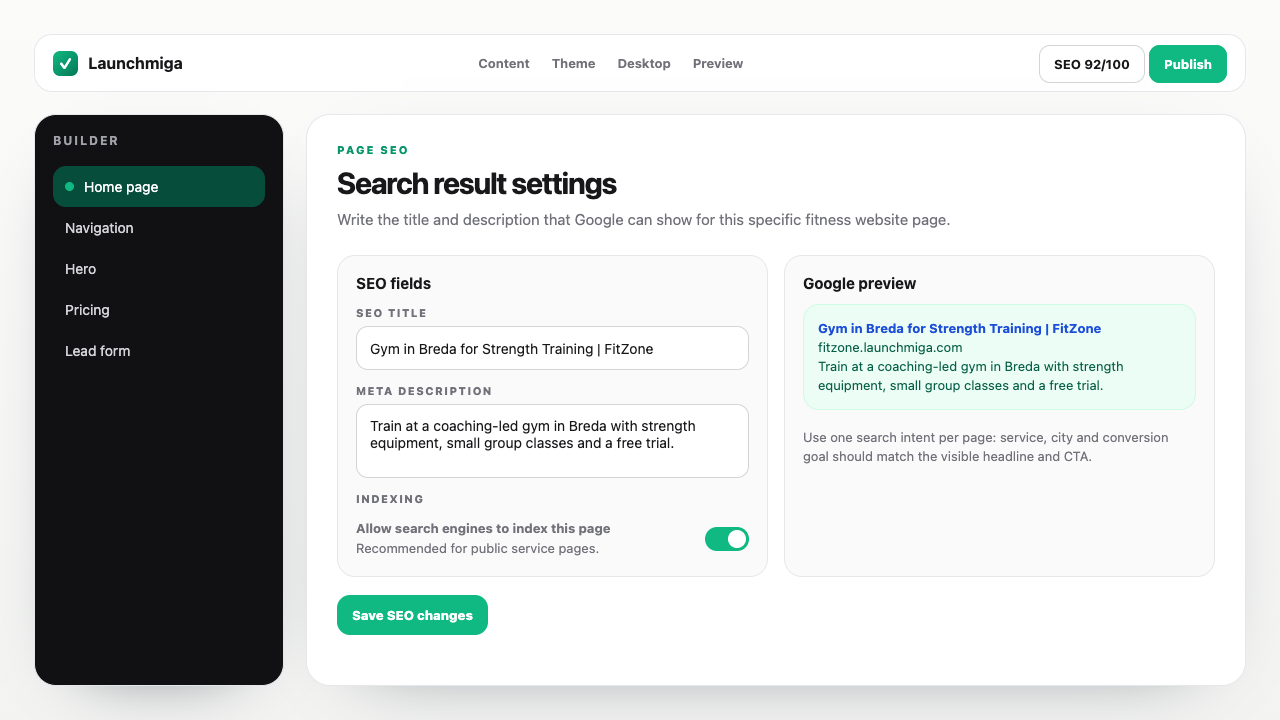
- 1
Open SEO panel
Switch pages from the page menu first if you need SEO for a specific URL. Practical example 1: do not write only 'Welcome to our studio'. Use a search-focused title such as 'Yoga studio in Utrecht for beginners and yin yoga'. When you finish this step, read the page as a visitor who searched for a local fitness solution. The copy should answer what this is, who it is for, why it is trustworthy, and what to do next.
- 2
Write for search intent
Include city + service (e.g. personal trainer Amsterdam) in title and description naturally. Practical example 2: do not write only 'Welcome to our studio'. Use a search-focused title such as 'Yoga studio in Utrecht for beginners and yin yoga'. When you finish this step, read the page as a visitor who searched for a local fitness solution. The copy should answer what this is, who it is for, why it is trustworthy, and what to do next.
- 3
Check Google preview
Use the preview block to see approximate snippet length before publish. Practical example 3: do not write only 'Welcome to our studio'. Use a search-focused title such as 'Yoga studio in Utrecht for beginners and yin yoga'. When you finish this step, read the page as a visitor who searched for a local fitness solution. The copy should answer what this is, who it is for, why it is trustworthy, and what to do next.